How Blitzy Built This Blog
Mar 13, 2026 • Aditya Karra • 7 min read
This page was built by someone who has never written a line of code.
Hi. I'm Aditya, a designer at Blitzy. My tools are Figma, sticky notes, and an unhealthy number of open browser tabs.
In two and a half consecutive days, I took this blog feature from blank canvas to production. Most of that calendar time was spent waiting for code generation to finish while I did other work. Blitzy did all the code generation end-to-end, content modeling, and QA without any engineering resources formally assigned to the effort.
This post is the proof. The deep dive. And also, somehow, the product.
How did Blitzy build this Blitzy blog page? Here's the story.
Building with Blitzy Initiative
This Blitzy blog post is the first in a series called Building with Blitzy, a collection covering Blitzy's implementations of different applications. These posts will show what is possible with our platform, how we get the most out of Blitzy, and the impact these applications have in production.
Blitzy is committed to pushing the boundaries of technical excellence and welcomes project suggestions from the community about what our autonomous software development platform should build next. Any inquiries can be directed to [email protected].
Identifying Blog V1 Objectives
The best V1 is not the one with the most features. An optimal V1 makes V2 trivial.
The goal: a functional blog for the marketing website including a listing page, individual posts, a promotional banner, and the nav updates to stitch it together.
My wish list for more components was long, including: tag-based filtering, category pages, rich author profiles, audio for listening to posts, newsletter signup, and social sharing. I decided none of this functionality belonged in the first run.
Every content model, every data field, and every component is structured so that all of those features could be added later without re-plumbing anything.
Blitzy's Input: Figma Designs & Prompt
My Figma work was familiar territory, but the audience was different. Rather than designing for developers during sprint planning, I was designing a schema for Blitzy to parse, understand, and turn into production code.
I set up seven dedicated frames covering every touchpoint: banner notification, header nav, footer nav, blog listing, card grid, content page, and the conditional sections that only appear when three or more posts exist. Each frame had at least four screens across breakpoints.

~7 frames × 4 screens = ~28 screens of documented, annotated, responsive design. One code generation run.
Along with the Figma, I wrote a structured prompt for the platform.
Click here to view my prompt. The key parts: audit the existing codebase first, list every component that already exists before building anything new, reuse what matches, extend what's close, and only create from scratch as a last resort.
I gave Blitzy an explicit priority hierarchy for decision making: existing code wins over Figma, and Figma wins over given text notes. The UI had to be fully renderable with static mock data, so Contentful could plug in later without any structural changes. Three complete sample articles, realistic content, structured to match the CMS content model exactly.
My small decisions that compounded:
Naming everything. Every layer, every section, every component. Proper auto layout, explicit spacing tokens, clear hierarchy. The platform reads these names and uses them to structure its output.
Frame 437tells the machine nothing.BlogCardGrid_Desktoptells it everything.Left notes in the frames. Blitzy reads the full Figma context, not just shapes and colors, but text. I embedded behavioral specs right alongside the visuals including truncation rules, hover expectations, and clickable area definitions. 20 discrete policies were written as plain sentences sitting right there on the canvas. Instructions located exactly where the machine is already looking.
Told it what not to build. The marketing site already has a component library. I explicitly told Blitzy: if similar functionality exists in the codebase, use it.
Made the file lighter, sneakily. For elements already implemented, I swapped live Figma components for flat images. Visually identical to a human reviewer. But for the platform? Dramatically less to parse. It only needed to deeply analyze the new components. Everything else was scenery.
Threw curveballs. Variable typography scales across breakpoints. Non-linear component resizing. Responsive behaviors that go beyond "stack on mobile." I wanted to see how the platform handled genuine design complexity, not just happy paths.
Basically, I told Blitzy: here are 28 screens, here are the rules, figure it out.
Code generation took eight hours. Blitzy worked through every frame, every breakpoint, every annotation. The output: clean, component-structured frontend code. Correct spacing. Correct type scale shifts. Correct conditional rendering. Blitzy inferred hover animations on its own from existing codebase patterns to match previous design decisions that were excluded from the requirements.
The level of precision executed by Blitzy always continues to surprise me. Though I should not have been, because every agents' work goes through more validation than typical engineering workflows.
To provide a sense of the details extracted from my Figma frames, here's a snippet of the token manifest Blitzy generated before writing a single line of code:
| Category | Token | Value | Usage Count |
|---|---|---|---|
| Color | banner-bg | #5B39F3 | 3 |
| Color | text-body | #333333 | 6 |
| Color | text-secondary | #999999 | 5 |
| Color | blockquote-border | #D9D9D9 | 2 |
| Spacing | space-24 | 24px | 12 |
| Spacing | space-48 | 48px | 6 |
| Spacing | space-80 | 80px | 8 |
| Typography | heading-xl | Inter 500 / 56px / 1em / -4% tracking | 6 |
| Typography | body-md | Inter 400 / 16px / 1.5em | 10 |
| Typography | blockquote | Inter 500 / 32px / 1em / -4% tracking | 2 |
| Radius | radius-16 | 16px | 4 |
| Radius | radius-32 | 32px | 4 |
Blitzy counted usage frequency across all 28 screens. Just like the hover animations it inferred from existing codebase patterns, the token manifest was something the platform decided was worth doing on its own.
Content Pipeline with Contentful
With the frontend generated, I needed a content pipeline. The blog had to exist in Contentful, so marketing and growth teams could publish posts without coding.
I could have waited for engineers to wire this up, but I was curious. Could I do the wiring myself?
I asked Blitzy to generate a comprehensive handoff document at the end of the run containing every content model, every field, every validation rule, and the full setup playbook. I loaded the playbook into a Claude project as a reference companion. Then, I looked up just enough about JSON to understand the report: key-value pairs, nesting, that kind of thing. Not a deep dive. Just enough to stop being intimidated by curly braces.
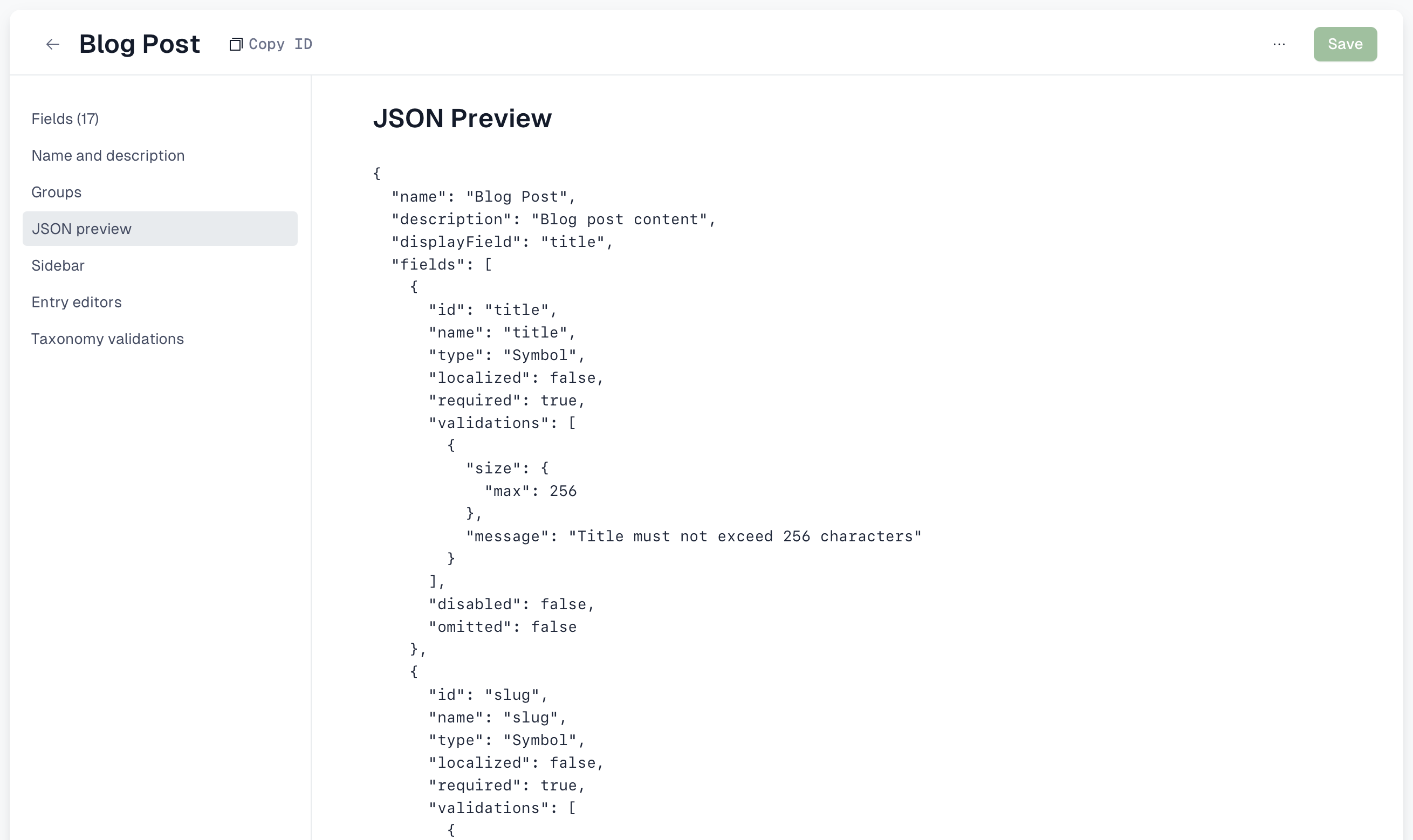
The first content model took the longest. I was second-guessing whether I was setting up field validations correctly. By the fourth model, I was moving on autopilot.
I built four content models in Contentful:
- BlogPost: 17 fields. Some serve the UI today; others (tags, category references) are scaffolding for features we haven't built yet.
- Author: name, avatar, bio, role.
- BlogCategory: for the filtering that's coming next.
- BannerNotification: the promotional strip at the top of every page.
One principle guided every decision: the people publishing blogs day-to-day would be the marketing and growth teams. Every model was designed so that writing a post feels like filling out a form. If it required understanding JSON to publish, that would be a failure.
What's Left? Remaining Tasks
Not everything was smooth. That would be a boring development story.
I wired Contentful into the frontend. Worked perfectly on local. Deployed to dev for the formal review to begin.
After running a full UI audit, I caught some small issues: pixel misalignments, color inconsistencies, and a hero image with phantom padding from a double-counted header offset. Everything went into one PR.
The final polish was a handful of one-liner CSS fixes that took about 30 minutes with Claude Code in the terminal. That was the only part that looked like traditional "coding", and even that was guided conversation. Knowing what needed to change was the hard part.
Why Does This Matter?
When I handed Blitzy those 28 screens, I closed the tab and moved on to other tasks entirely.
Eight hours later, the code was there. Componentized. Responsive. Matching existing patterns. Animations inferred. Conditional logic built.
There is a difference between a coding copilot and an autonomous software development platform like Blitzy. I did not sit there feeding Blitzy instructions one at a time. I did not check in halfway through. I gave Blitzy context, set the constraints, and worked on other high priority tasks until Blitzy surfaced with production ready code. The distinction in autonomy matters.
Two and a half days later, I went from blank canvas to a production-ready blog. The actual hands-on time was a fraction of that. The Figma documentation, the Contentful setup, the debugging, and the polish was all me. The heavy middle, the part that would have traditionally been a sprint's worth of engineering work, happened while I continued my typical design work.
My product experience drove the design thinking, the scope discipline, and the content architecture for the blog. None of that was automated. The painstaking translation from design to code, the part that usually requires a handoff, a queue, and rounds of review, happened seamlessly.
This is the inaugural post about how Blitzy built our blog. With that initial commit, I am officially an engineer! Ironic, isn't it?